Google Ads is under-reporting your conversions. And you probably don’t know it.
Conversion tracking in Google Ads is failing more and more often. Some orders never reach the panel, ROAS shows up lower than it really is, and the algorithm learns on increasingly patchy data. Google has responded with a new solution — Google Tag Gateway — which is meant to “recover” those lost conversions. But will it actually help, or is it another piece of hype that ends in prettier numbers in the report but not in your pocket? We’re checking, no sugar-coating.
What you'll learn from this article:
- why Google Ads shows fewer conversions than your campaigns actually generate,
- the real causes of the gaps in measurement (Safari ITP, ad blockers, Consent Mode),
- how lost data affects ROAS and the budget decisions in your store,
- what Google Tag Gateway is and how it works under the hood,
- how Tag Gateway differs from server-side tracking and enhanced conversions,
- whether it’s worth implementing Tag Gateway or better to wait,
- how to check, in three simple steps, whether you have a measurement problem.
What does “Google Tag Gateway boosts ROAS” mean?
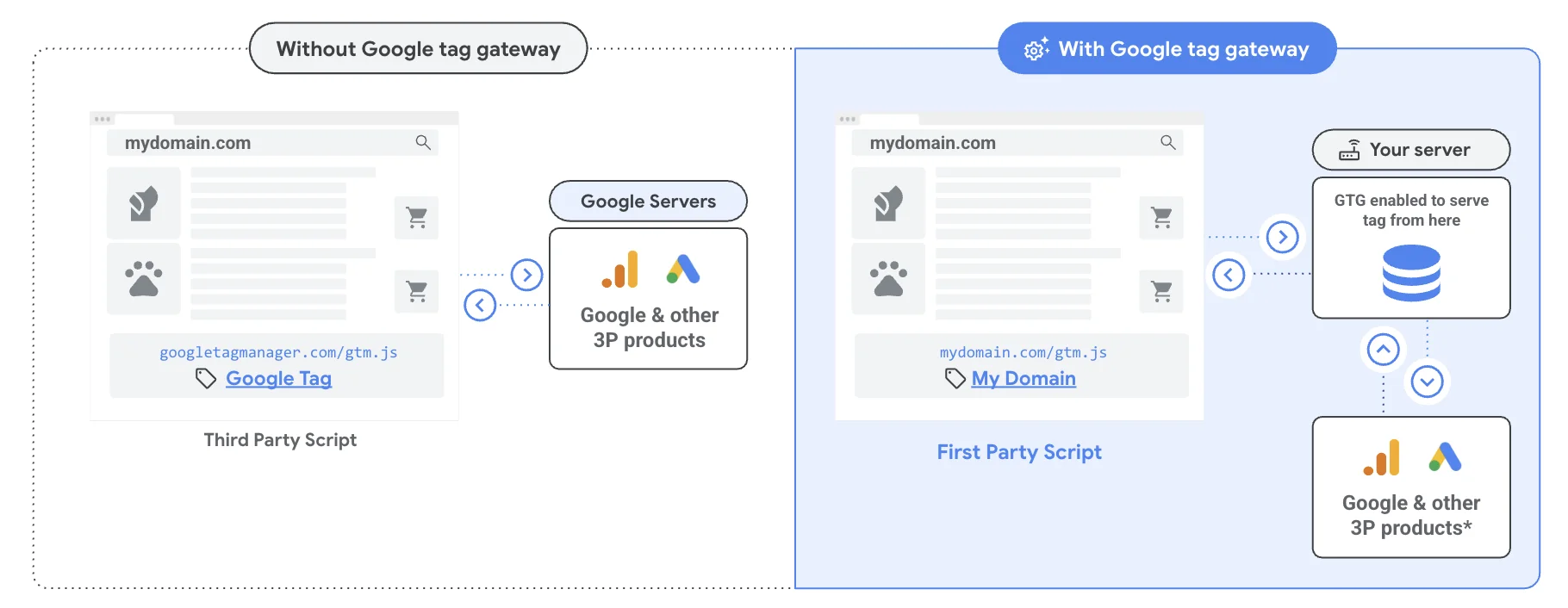
In short: Tag Gateway is a Google mechanism that routes measurement scripts through your own domain, so they’re blocked less often by browsers (Safari ITP), ad blockers, and Consent Mode. In theory, this recovers conversions that previously “got lost” along the way, which means the Google Ads algorithm sees a fuller picture and can optimise campaigns better. In practice — as with every new must-have from Google — the real benefits depend on the specific store, and some of the “recovered” conversions are simply a different attribution of credit in the reports. Worth testing, but with plenty of caution.
Why Google is still the number-one channel for e-commerce
Recent times in marketing can look like a race towards social. TikTok, Reels, influencers, UGC. Everyone is investing heavily in Meta, testing Gen Z communication on TikTok, and handling a larger number of creatives. And that’s fine — these are real channels that deliver sales for plenty of stores.
But in all the excitement over the new platforms, something has slipped a little out of view — something that for most e-commerce businesses is still the number-one or number-two channel: Google. Search, Shopping, Performance Max — these are still the networks where people look for specific products with specific buying intent. Someone typing “women’s waterproof hiking boots” into Google is much closer to the basket than someone scrolling TikTok who happened to see your ad.
The problem is that for Google Ads to really work, conversion tracking has to be watertight — the algorithm has to know what happens after the click. Who bought, for how much, how quickly, whether they came back. Without that data, the bidding algorithm is shooting blind — and the store pays for those shots.
And this is where the story I want to tell today begins. Because there’s a good chance your Google Ads has been showing you worse results than you really have for a while now. Not because the campaigns are set up badly. Because the data isn’t reaching them.
Symptoms of the problem — how to tell you have gaps in your data
Maybe you’ve found yourself looking at the Google Ads panel with the feeling that something doesn’t add up. In Shopify (or WooCommerce, Magento, whatever else) you see 100 orders in a week from that source. In Google Ads, the number of conversions from the same campaigns shows 67. You open GA4 and there’s yet another number there.
Maybe the agency or your in-house specialist explains it to you with multi-channel attribution or data models. And of course — some of that difference does come from there. But there’s also a good chance that a large part of those “missing” conversions simply never reached Google. It’s a classic e-commerce analytics problem that most stores have had for months without realising it.
Or another situation: a Performance Max campaign spends three weeks building up nicely, delivering conversions, ROAS rising. And then suddenly, with no change on your side, the results collapse. The algorithm has got lost. The classic explanation is the learning phase, seasonality, competitor activity. And sometimes it’s simply that Google stopped getting the data it was learning your customers on. This is a common scenario when optimising Performance Max — a campaign that “gets lost” often doesn’t have a problem with the algorithm, but with the quality of the data it’s being fed.
These can be symptoms of a real problem. And for most stores this problem already exists — it’s just not visible to the naked eye.
Why browsers block conversion tracking
When someone visits your site, various tracking scripts fire on it — Google Analytics, Google Ads, Meta Pixel, sometimes TikTok, sometimes others. They’re what register that someone viewed a product, added it to the basket, bought. And they’re what send that information to the relevant ad platforms. The problem is that browsers are blocking these scripts more and more heavily.
Safari, ITP, and the short life of cookies
Safari (so everything on iPhone and Mac) has for several years aggressively cut cookies and limited tracking through the ITP (Intelligent Tracking Prevention) mechanism. Firefox does the same by default. Chrome is slowly heading in the same direction under pressure from regulators. In practice, this means that a large chunk of your customers move around the site “invisible” to measurement scripts.
Ad blockers — uBlock, AdBlock, Brave
On top of that come ad blockers — uBlock, AdBlock, Brave — which in some countries (Germany, Poland, Scandinavia) are on the computers of tens of percent of users.
The result? Your scripts sometimes load, sometimes don’t. Cookies live a short time, so Safari often treats a returning customer as a new one. The algorithm simply doesn’t see conversions it can’t attribute to an ad — and the Google Ads algorithm gets increasingly patchy data to learn on.
Consent Mode and GDPR consent banners
There’s a third layer on top: GDPR consent banners and the Consent Mode tied to them. If a user doesn’t click “accept all” — and a large share don’t — measurement is limited or switched off entirely. That’s another thousands of conversions a month that the algorithm sees in a stripped-down version or doesn’t see at all.
This isn’t your fault. It isn’t the agency’s or the ad specialist’s fault either. The ecosystem has simply changed.
How lost data affects ROAS and budget decisions
Let’s say you spend €7,000 a month in Google Ads. Your real ROAS is 4 — meaning for every euro spent, you earn four. A decent result. But the ROAS that Google Ads sees is 3, because some conversions don’t reach it due to cookie-cutting in Safari or ad blockers.
What can the algorithm do based on that data? It decides the campaign is weaker than it really is. It starts bidding more cautiously. It shows your ads less often, or not to the users it should. As a result, you can end up earning less than you could.
The other side of the coin: you don’t know what’s really working. Since some conversions don’t make it into the system, you make budget decisions based on a distorted picture. You cut a campaign that genuinely earns, because it looks weak in the panel. You scale another one that looks great in the data, but that’s partly an illusion.
Google Tag Gateway — is it the solution to the problem?
Google obviously sees this problem (along with the shrinking budgets of advertisers who start to panic when they see worse results in the panel), and for a while now it’s been pushing a new solution very hard. It’s called Google Tag Gateway.
The idea, as always in Google’s marketing materials, sounds beautiful: instead of loading measurement scripts directly from Google’s domains (which browsers and blockers easily detect and cut out), we route them through your own domain. To the browser this becomes “trusted” traffic, the data isn’t cut, and the algorithms once again get the full picture. The systems promise an optimisation breakthrough and the return of lost ROAS.
Sounds great? Maybe it does, but it’s time for a little healthy scepticism. The truth is that right now Google is pushing the rollout of Tag Gateway enormously hard, while we — marketers and business owners — don’t actually know what real benefits we’ll get from it, or whether we’ll get any at all.
How Tag Gateway differs from server-side tracking
Tag Gateway is one of several answers to this problem — alongside server-side tracking (e.g. via a Google Tag Manager server), which does the same thing, only more comprehensively. The main difference: Tag Gateway is simple to implement and tailored to the Google ecosystem, but in practice it’s limited to Google’s tools. Server-side tracking takes more work, but it also works for Meta, TikTok, and other platforms — and gives you more control over what data goes where.

Enhanced conversions — a lesson from the past
This situation is incredibly reminiscent of a story from a while back, when Google pushed enhanced conversions with the exact same persistence. The narrative then was identical: it was meant to be the salvation of e-commerce, a tool that would recover the conversions we’d lost to GDPR consent banners, Consent Mode, and privacy changes.
And how did it turn out in reality? To this day it’s extremely hard to say clearly whether enhanced conversions genuinely helped optimise campaigns better and brought more clean profit. Or whether — which is very likely — the Google Ads system simply started matching data more cleverly and assigning itself more “medals” along the user’s path. It’s easy to show a higher number of conversions in the panel if the algorithm claims credit for Google Ads where the customer would have bought anyway, just to win the internal battle in the reports against Meta, TikTok, or organic traffic.
Is it worth implementing Google Tag Gateway?
Looking at the current hype, it’s hard not to worry whether Google Tag Gateway has exactly the same story in store for us. Is it really a technological step forward that will feed the algorithms with better-quality traffic? Or is it another complicated setup meant to give Google extra arguments and prettier numbers in the reports, to justify to you why it makes sense to spend money on their platform specifically?
One thing is certain: blind faith in every new “must-have” from Google rarely works out well. Tag Gateway is definitely worth keeping on the radar and testing, but with plenty of caution and without expecting it to be a magic wand that suddenly doubles your profits.
How to check whether your conversion tracking is working properly
Before you panic and start implementing Tag Gateway, server-side tracking, and everything else Google puts in front of you — it’s worth first checking how big your real problem is. Three simple steps:
- Compare the numbers from three systems for the same period. Take the last 30 days and check the number of orders in your store panel (Shopify/Woo/Magento), in GA4, and in Google Ads. Differences of 5–15% are normal. Anything above 20% is a signal that the data isn’t reaching where it should.
- Check the device split. In Google Analytics 4, look at how events break down by iOS vs Android and Safari vs Chrome. If iOS and Safari look disproportionately weak (e.g. iOS makes up 15% of sales in the store but 5% of conversions in Ads) — you have a classic symptom of ITP.
- Look at the conversion paths in GA4. If most conversions have “direct” or “unassigned” as the last source, when you logically know the customer came from an ad — that means the attribution is getting lost along the way, probably through cookie-cutting.
If all three tests come out badly, you have a real measurement problem — and that’s when it’s worth considering Tag Gateway, server-side tracking, or enhanced conversions. Most often, the best first step is an e-commerce analytics audit, which will show exactly where the data is getting lost and what’s genuinely worth fixing.
About the author
Dorota Puzio — A Google Ads specialist with experience across e-commerce projects — from smaller stores to larger chains. She looks at campaigns realistically: instead of getting carried away with every new feature, she checks whether it actually translates into the client’s profit. Day to day she combines the world of advertising with project management, also working as a Project Manager. After hours she travels, jumps on her bike, runs, and has recently been discovering new passions at theatre workshops. Find her on LinkedIn.
See other articles


The 10 most common mistakes in Meta Ads creatives that hurt campaign results [2026]