Meta One – what it offers, how much it costs and is it worth it? [2026]
Have you ever pasted a link into an Instagram caption, only to sigh and add “link in bio”? Same here. The good news: Meta is finally letting you add clickable links to posts. The less good news: nothing comes for free…
I’ve pulled together the key facts about Meta One: what’s changing, what stays the same and when a paid plan actually makes sense.
What you'll learn from this article?
- what Meta One is and how it differs from Meta Verified,
- what stays free and what you have to pay for,
- how much the business plans cost in Europe and what they really offer,
- how the Facebook link limit works and how to check if it applies to you,
- when a subscription makes sense and when you can safely skip it,
- how to drive traffic from social media without a paid plan.
What is Meta One?
Meta One is an optional subscription for Instagram, Facebook, WhatsApp and Meta AI. The core features of the apps remain free, while paid plans unlock extra tools – for brands, mainly links in posts and Reels, verification, team access and extended insights. Meta One doesn’t boost the reach of your posts, but from the Advanced plan upwards it helps people find your profile.
What exactly did Meta announce?
On 15 September 2026, Meta introduced Meta One in its official announcement. The subscription launches with more than 50 features, Meta says it has already recorded 15 million subscriptions and trials, and the plans are being rolled out gradually. Over time, they’re set to cover the Edits app and AI glasses as well.
The subscription is split into two worlds:
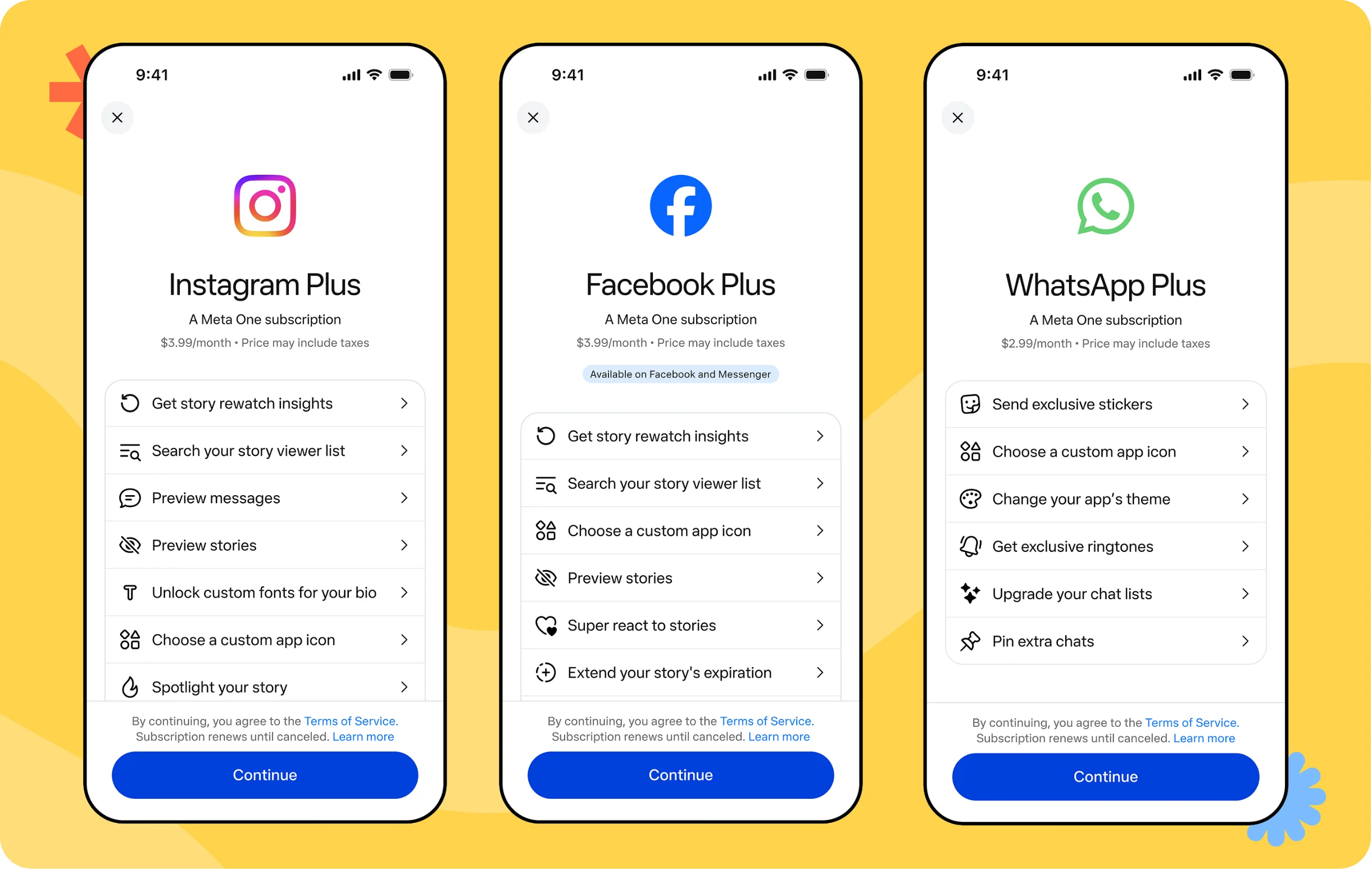
- The first is plans for individuals: Instagram Plus, Facebook Plus, WhatsApp Plus, plus the Core and Premium bundles. Custom fonts in DMs, effects, more image and video generation in Meta AI – fun, but from a brand’s perspective more of a curiosity.

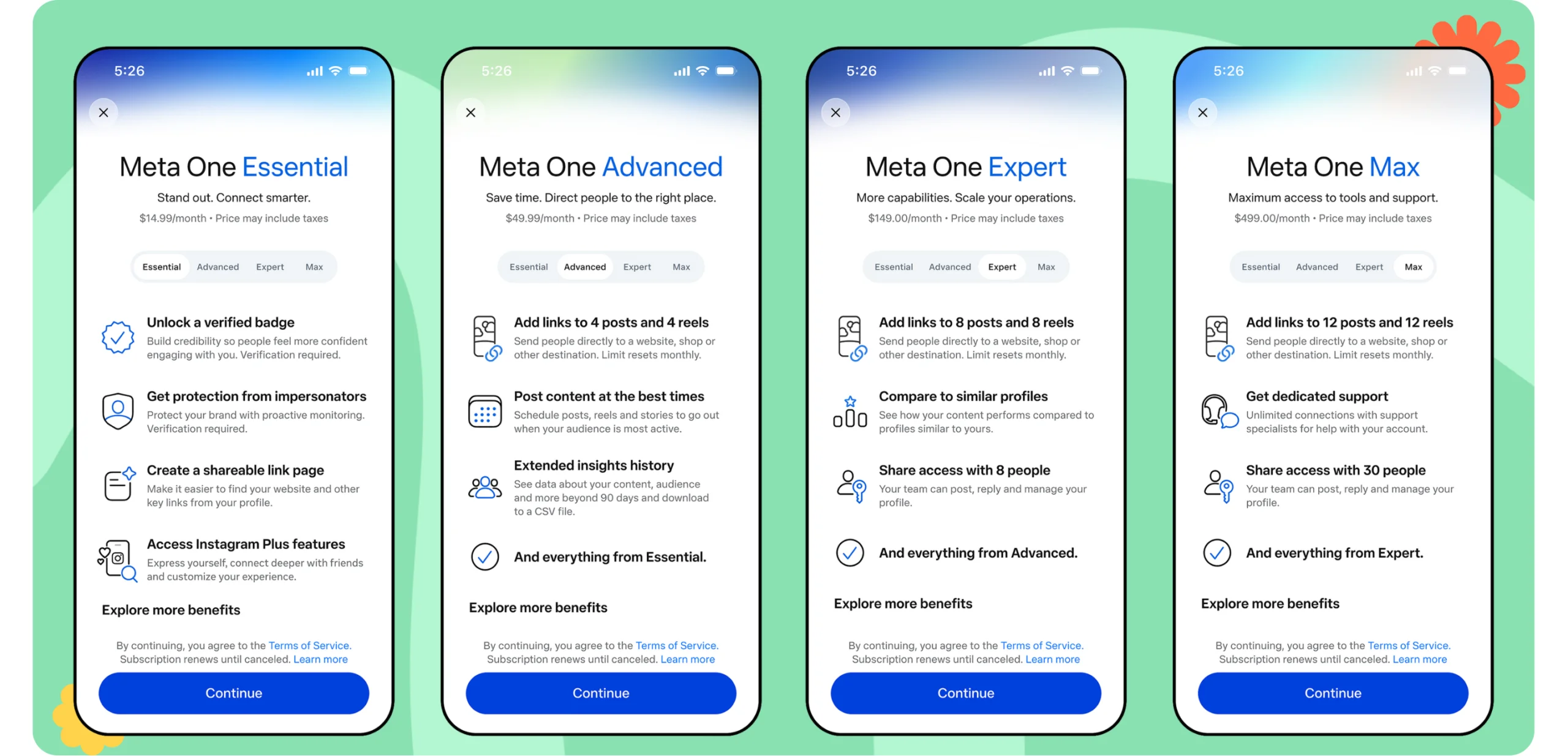
- The second world is plans for businesses and creators: Essential, Advanced, Expert and Max. And that’s what we’re focusing on.
🔄 We updated this article several times while writing it. Meta One is a fresh change, and Meta adds new details or clarifies the rules every few days. Depending on when you’re reading this, some details may already have changed. That doesn’t make it any less important – it’s worth keeping an eye on further updates. Last updated: 30.09.2026.
Meta One doesn't buy you reach
Let me start here, because it’s the first thought that comes to mind: if I pay, the algorithm will show me to more people, right? Well, no.
Meta One doesn’t boost the reach of your posts. The Advanced plan and above do, however, offer features that help people find your profile: a spot in the Facebook feed, a higher position in search results, a highlighted “Follow” button on Reels and automatic follow invitations. That’s support in gaining followers, not a guarantee of impressions.
Whether anyone sees your post in the first place still depends on the content and the signals it sends. It’s the same mechanism we wrote about in the context of Andromeda in Meta Ads and creative as the new targeting. A subscription won’t get around that.
💡 Meta One won’t make more people see your post. It may make more of them click on it.
What do you still get for free?
Day-to-day profile management doesn’t change. You still get for free:
- publishing posts, Reels and Stories,
- a link in bio on Instagram,
- links in Stories (the link sticker), with no limit,
- product tags, if your shop is connected to Meta,
- links in Facebook posts (with one “but”, more on that below),
- boosting posts and running ad campaigns.
What do you have to pay for in Meta One?
For things that have long been a must-have for many brands: links and scheduling Stories in the app, for example. For a good share of our clients, the link is the very reason they post: a launch, a promotion, sign-ups, a landing page.

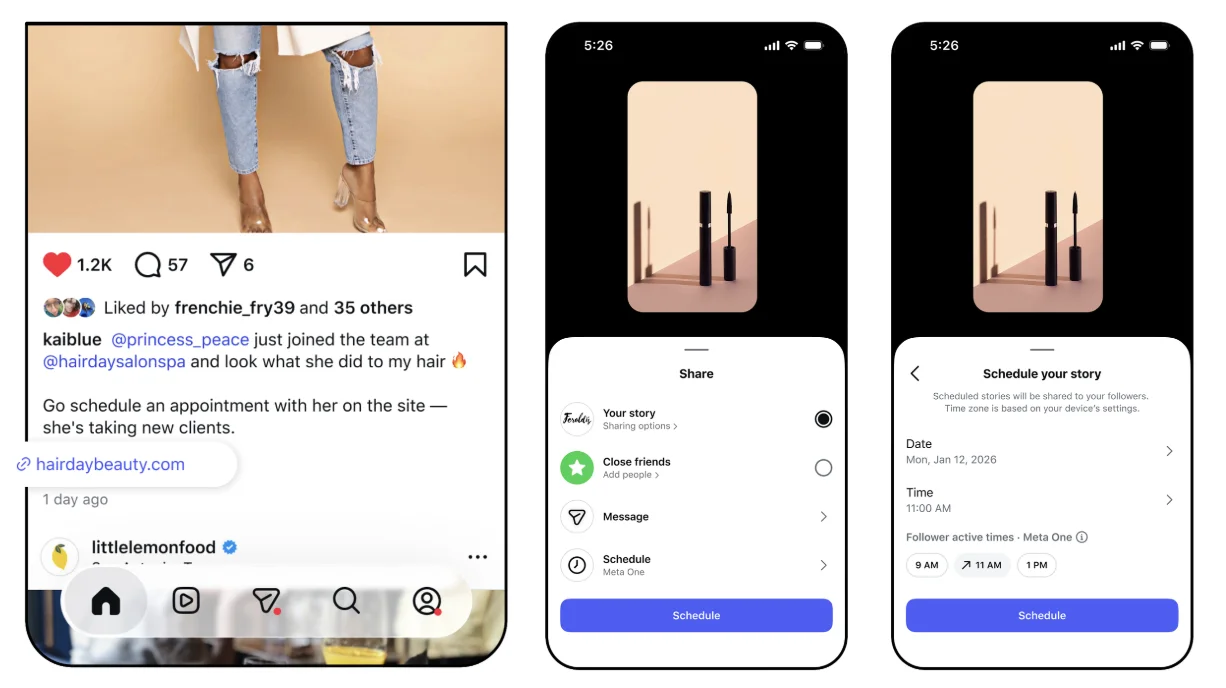
You only get clickable links in organic Instagram posts and Reels from the Advanced plan upwards. And only a limited number per month. A few rules from Meta’s Help Centre worth knowing before you start planning:
- links only work on public accounts,
- posts and Reels have separate limits,
- unused links don’t roll over – the limit resets on your subscription renewal date,
- you can’t edit a link after publishing,
- links to Facebook, Instagram, WhatsApp and Threads, as well as product tags, don’t count towards the limit.
That penultimate point is my favourite. Anyone who’s ever launched a campaign with a typo in the UTMs knows exactly what I mean. There’s no “I’ll quickly fix it” here – you check the link before publishing or you lose the slot.
⚠️ A link in a post is now a resource, not a given. A wasted link is a wasted slot you won’t get back.
Facebook and the 2-link limit - who does it affect?
Alongside this, Facebook has a limit for Pages without a subscription: 2 posts with an external link per month. Meta has been testing it since December 2025 and is rolling it out to more and more Pages. According to the plan descriptions, Facebook links are available from the Advanced plan upwards, and are unlimited on Max. Check the exact scope when you buy.
How can you tell whether the limit applies to your Page? The simplest way is to start creating a post with an external link, ideally in the Facebook mobile app. If a message about the limit appears, your Page is affected. If not, you can post links without restrictions for now.
On our team, we check every client Page this way and note the result. And we keep coming back to it, because the test is expanding.
Meta One plans for businesses - European prices and what they really offer
Prices are per profile. The plans are tiered: each higher plan includes everything from the one below and adds something on top.
| Plan | Price | Links in posts and Reels (per month) | What else you get |
|---|---|---|---|
| Essential | from ~€16.99/month | no links in posts or Reels | blue verification badge, impersonation protection, link page with up to 20 links in bio, Instagram Plus features |
| Advanced | from ~€54.99/month | Instagram: 4 posts and 4 Reels Facebook: 8 posts and 8 Reels | everything in Essential, plus a spot in the Facebook feed, higher position in search, highlighted “Follow” button on Reels, automatic follow invitations, Stories scheduling up to 30 days ahead, exportable insights, account access for 4 people without sharing a password |
| Expert | from ~€169/month | Instagram: 8 posts and 8 Reels Facebook: 20 posts and 20 Reels | everything in Advanced, plus benchmarking against similar profiles, account access for 8 people |
| Max | from ~€549/month | Instagram: 12 posts and 12 Reels Facebook: unlimited | everything in Expert, plus dedicated support, account access for 30 people |
In my view, the most important line in this table is the one between Essential and Advanced. Essential gives you the badge, impersonation protection, a 20-link bio page and Instagram Plus features. So if links are the main reason you’re considering Meta One, the real entry point is ~€55, not ~€17. It’s also worth remembering that on Instagram, even Max gives you 12 post links a month – fewer than 3 a week. Higher plans give you a bit more room in your calendar, but none of them spares you from planning on Instagram.

👉 One important note: Meta states that features, prices and availability may vary by region, app and account. You’ll only see the exact scope during checkout.
What else do paid business plans offer?
Every business plan, starting with Essential, gives you more access to Meta Business Agent – an AI assistant that replies to customers on WhatsApp around the clock. The higher the plan, the more replies it can handle. For brands that get lots of enquiries in messages, this could be an even stronger argument than the links themselves.
There’s one more perk I’m personally most interested in: support. Meta says higher plans get priority handling of requests, faster resolution and the option to speak to an agent, with dedicated support on Max. Anyone who’s ever tried to recover a blocked account knows how much that can be worth. 🥶
What not to confuse with Meta One
- Meta Verified is a separate, older service with a verification badge. It works unchanged for now – Meta plans to gradually move subscribers to Meta One and will notify them about the migration.
- The ad-free subscription is a separate product for users, not for brands.
So, should you buy Meta One?
The short, standard marketing answer: it depends 🫠. Specifically, on how much your brand relies on clicks from social media.
Let’s take two examples. A cosmetics shop that launches new products and promotions every week, with a large share of its website traffic coming from Instagram. For them, 4 links in posts and 4 in Reels a month have a real impact on sales. Now take a B2B service company that mainly uses Instagram for brand image and employer branding. Same price, completely different return.
A subscription makes sense if:
- you drive traffic from Instagram to your website or shop – then you need at least the Advanced plan; every extra step, like going to the profile and hunting for the link in bio, loses you some people along the way,
- your Facebook Page has hit the link limit, and you regularly link to your blog, offers or events – 2 links a month will run out faster than you think,
- credibility matters to you – the badge and impersonation protection help brands fighting fake accounts and industries built on trust (finance, e-commerce, premium services); Essential is enough here,
- several people manage your profile – password-free access and exportable insights make working with your team and agency smoother. Sharing passwords on Slack really isn’t a good idea.
You can skip it if:
- social media builds your brand image rather than sales – links in posts won’t change much,
- you’re hoping for more reach – the subscription won’t guarantee it,
- you have several profiles and a limited budget – the price applies per profile, so with three accounts on Advanced you’re already paying around €165 a month,
- you (still) don’t have a limit on Facebook – there’s no need to change anything for now.
✨ The question isn’t “is Meta One any good?”, but “how many clicks from a post is your month worth?”.
How to drive traffic from social media without a subscription
Let’s wrap up with the practical side. You can still send people to your website without a paid plan:
- Treat your link in bio like a landing page: up to date, well organised, with the most important link at the top.
- Use Stories: the link sticker works with no limit and no subscription.
- Match the CTA to the post: say “click” only where there actually is a link. In other posts, use “link in bio” or point people to your Stories. Nothing frustrates an audience more than a CTA that leads nowhere.
- Plan your links like a budget: if you have a paid plan, save your allowance for launches, promotions, deadlines and landing pages. Tailor the rest of your content to your audience’s stage of awareness – not every post has to sell.
- Don’t forget about ads: Meta Ads campaigns can link without limits and still drive scale. If you want to know how their logic has changed, read about the changes in Meta Ads in 2026.
Meta One - a long-awaited convenience, just not a free one
From a marketing perspective, these features are genuinely useful. We’ve been running social media to drive website traffic and sales for a long time, and until now we’ve had to take the long way round: link in bio, “check our Stories”, “send us a DM”. A link right in a post or Reel is simply a shorter path to the goal.
In my view, an equally big change is being able to schedule Stories up to 30 days ahead directly in the app. I know you can already do this in Meta Business Suite or third-party tools, but not everyone uses them. I’m sure many a social media specialist is already glad they won’t have to post a Story with a link sticker in a hurry on the bus. It makes day-to-day work so much easier.
It’s just a shame you have to pay for everything. For brands that live off social media traffic, Advanced may simply become another line in the marketing budget, next to design or scheduling tools. For everyone else, a link in bio, Stories and ads will still do the job. And if you’re not sure which side your brand is on, get in touch. We’ll happily look at your profiles and tell you straight whether it’s worth paying.
✅ In short: Meta has finally given us what we’ve been asking for for years – just with a price tag. Whether it’s worth paying depends on how much your brand gains from every click straight from a post.
FAQ
What is Meta One?
Meta One is an optional, paid subscription for Instagram, Facebook, WhatsApp and Meta AI, announced by Meta on 15 September 2026. The core features of the apps remain free, while paid plans unlock extra tools – for businesses, these include links in posts and Reels, account verification, Stories scheduling and team access.
Does Meta One increase reach?
Not directly. The subscription doesn’t boost the reach of posts. The Advanced plan and above do, however, include features that help people find your profile, such as a spot in the Facebook feed and a higher position in search.
How much does Meta One cost for businesses in Europe?
In the EU, business plans start from around €16.99 a month (Essential), €54.99 (Advanced), €169 (Expert) and €549 (Max). Prices are per profile and may vary by country and account.
Which Meta One plan includes links in Instagram posts?
Clickable links in organic Instagram posts and Reels are available from the Advanced plan: 4 in posts and 4 in Reels per month. Expert gives you 8 of each and Max 12. The limit resets on your subscription renewal date, and unused links don’t roll over.
Are links in Instagram Stories paid?
No. The link sticker in Stories is free and unlimited. The link in bio is also free, but the basic version has a limited number of links – the Essential plan expands it to a page with 20 links.
Is there a limit on links in Facebook posts?
Yes, for some Pages without a subscription: 2 posts with an external link per month. Meta has been testing this limit since December 2025 and is extending it to more Pages. According to the plan descriptions, Facebook links are available from the Advanced plan and are unlimited on Max. The easiest way to check whether the limit applies to you is to create a post with a link – if it does, you’ll see a message.
Can you schedule Stories with Meta One?
Yes. From the Advanced plan, you can schedule Stories up to 30 days ahead directly in the app. Stories can also be scheduled in Meta Business Suite and third-party tools.
How does Meta One differ from Meta Verified?
Meta Verified is a separate, older service with a verification badge. It works unchanged for now, and Meta plans to gradually move subscribers to Meta One and notify them about the migration. Meta One is a broader package – the verification badge is just one element of its business plans.
About the author
Adrianna Roszak – Meta Ads and TikTok Ads specialist with experience working with e-commerce brands. She creates ad campaigns that combine a technical approach to ads with a creative strategy based on testing and data. Her work focuses on making sure creatives respond to real audience needs and work well with the platforms’ algorithms. She helps brands build effective, scalable advertising systems instead of one-off, random campaigns. Find her on LinkedIn.
See other articles


How to start selling on TikTok Shop – step by step