Product listings and categories on TikTok Shop: the requirements you can’t skip
Since everything on TikTok Shop starts with video, the product listing must be just a dull formality to tick off between one recording and the next, right? Sounds reasonable. It’s wrong.
Video is like a film trailer: it creates buzz and pulls people to the cinema. But the product listing is the screening room where the viewer either stays or leaves, and it’s what decides whether the product makes it onto the bill at all, because TikTok Shop checks listings surprisingly thoroughly. We write from the perspective of a practitioner who has taken plenty of products through this verification, so below you’ll find not just a list of fields but the spots where listings most often come unstuck.
What you'll learn from this article
- what a good TikTok Shop product listing has to contain,
- why the brand field is mandatory,
- how to sell more from the listing: bundles, linked videos and reviews,
- which categories are restricted or banned,
- why it doesn’t pay to game the category,
- which marketing claims to avoid.
In brief: the TikTok Shop product listing at a glance
A TikTok Shop product listing isn’t a formality, it’s the place where video turns into a sale, and it’s the part the platform checks most closely. A good listing has the full set of fields (name, the mandatory brand, correct category, description, photos that match the real product, variants, price, stock), plus, where relevant, ingredients, warnings and any documents the category requires. The listing is also a conversion tool: bundles (virtual bundles, combined listings), linked videos and reviews genuinely lift sales. What not to do: leave the brand field empty, game the category, or promise things you can’t defend.
What a good product listing has to contain
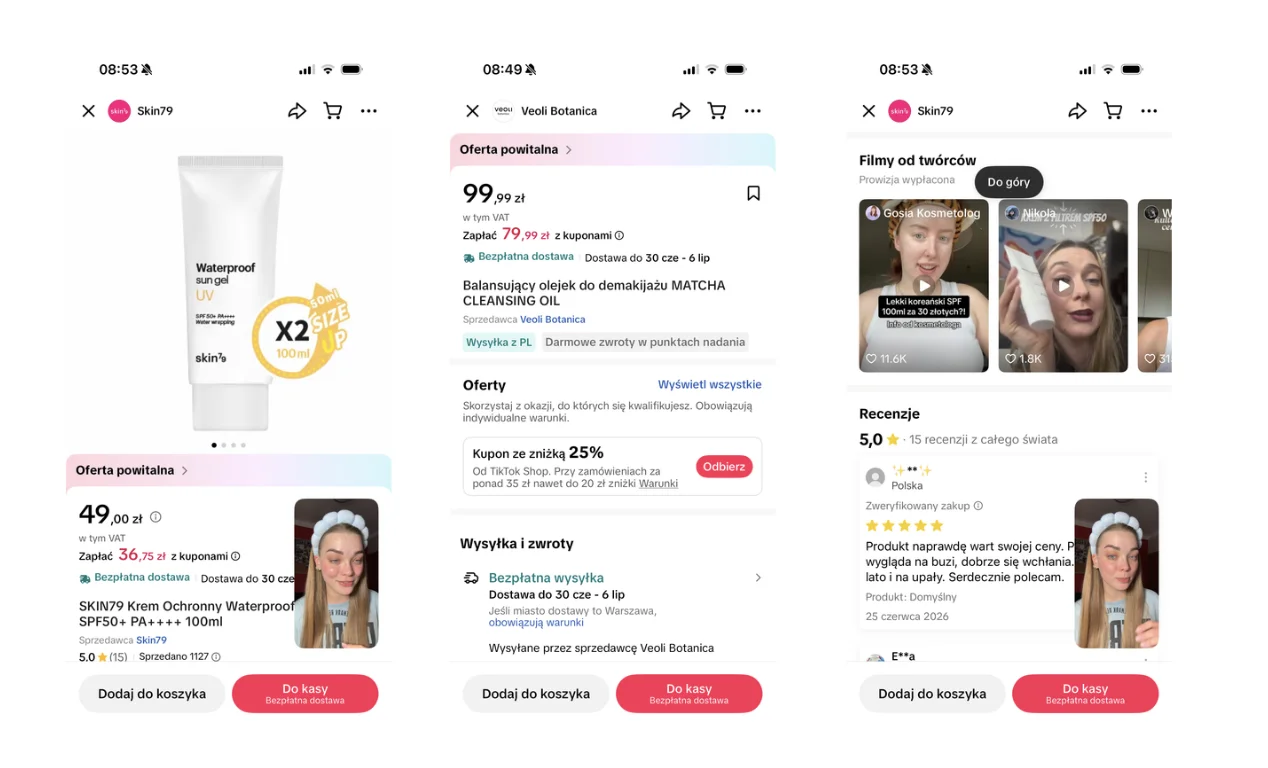
Rule number one: be specific. A TikTok user has a short window of patience, and in a few seconds they need to grasp what they’re buying, who it’s for, and why it’s worth it. A listing that makes them guess is a listing that doesn’t sell. Here’s the full set worth getting right:
- a clear product name,
- the correct brand (more on this in a moment, because it’s a favourite trap),
- the correct category,
- an accurate description,
- ingredients or specification, if relevant,
- variants (size, colour, capacity),
- photos that match the real product,
- size, weight, capacity or gram weight,
- how to use it, if that matters,
- any required warnings,
- documents, certificates or labels, if the category needs them,
- the correct price and the correct stock level.
💡 Remember that TikTok Shop is still e-commerce. Even if the sale starts with video, the listing builds or undermines trust. The photos have to match what the customer actually receives, because a gap between promise and reality is the shortest route to returns and poor ratings, and TikTok Shop doesn’t forget those.

The brand is mandatory, even if you don't have one
Here’s the first trap, and it catches many sellers at the least rewarding moment: right before publishing. TikTok Shop has a favourite question that some sellers can’t answer: “and what brand is this?” And it won’t accept “well… none” for an answer.
The brand is a required field in the product structure on TikTok Shop, even if you don’t work with brands day to day. Leaving it out can stop the product at the gate, and with bulk uploads (CSV, integration) it’s especially easy to miss, because “surely the rest is fine”. The rest is fine, and the product still won’t budge.
If you sell items without a distinct brand, you still have to fill this field in sensibly. Better to settle it once, calmly, than to discover it on your third rejected listing at 11pm. There’s more on feed structure and uploading products in the piece on TikTok Shop integration with e-commerce.
The product listing is a selling tool too, not just compliance
So far we’ve talked about what has to be on the listing. But there’s a second layer: what can go on it to make it sell more. A TikTok Shop product listing isn’t a dead form, it’s a set of conversion tools. A few that are genuinely worth reaching for:
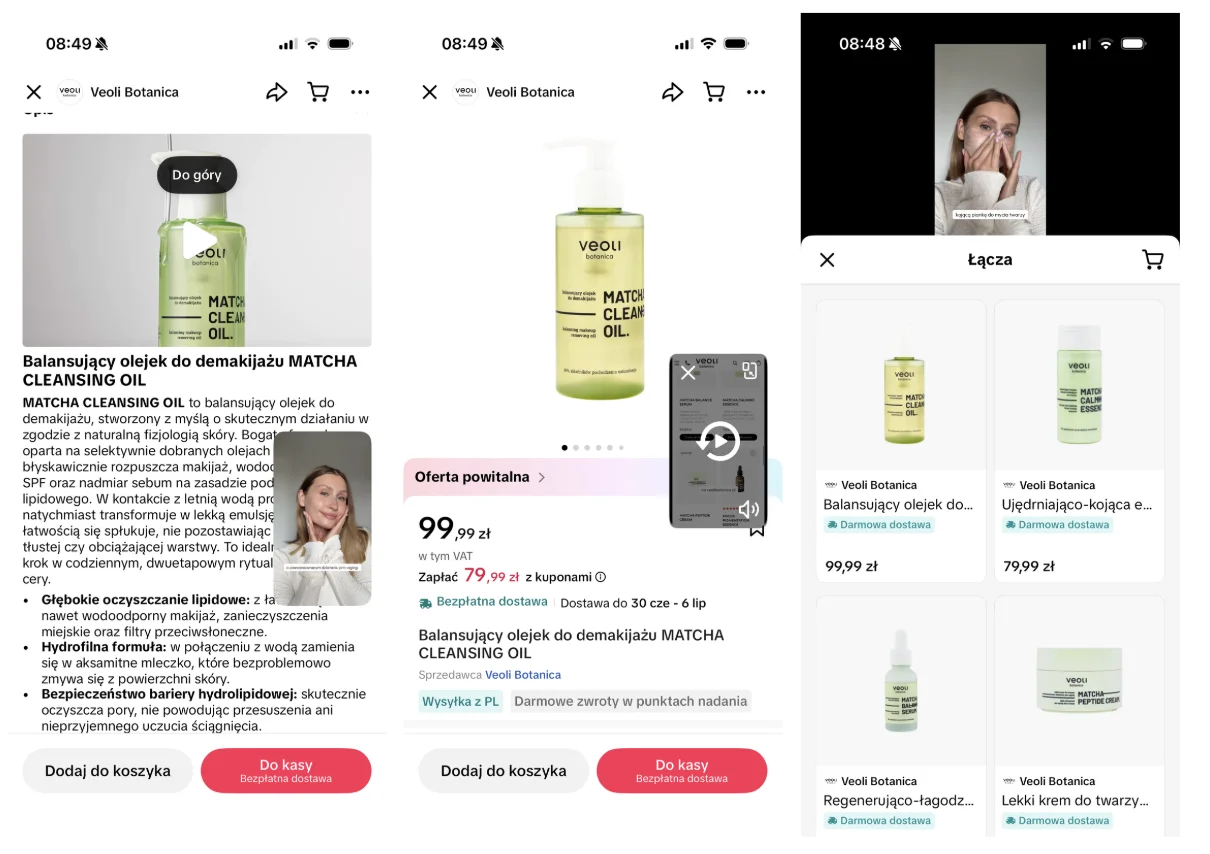
Bundles and sets. Instead of selling a single product on a thin margin, you can combine products into packages. TikTok Shop gives you a few mechanisms here, including virtual bundles (several existing products sold as one package, with no physical packing in the warehouse) and combined listings (linking separate offers that the buyer moves between like the variants of one product). The effect is exactly the one we like: a higher average order value (AOV) and more room for a creator commission without going underwater. That’s why a starter kit, a gift set or a bestseller box is often a better idea than a lone product on the shelf.
Linked videos and LIVE. A TikTok Shop product listing doesn’t live in isolation from content, quite the opposite. The videos and streams that tag your product attach to it and drive traffic. The platform in fact settles sales across three content types: the product listing, video, and live. In practice that means the more good content circulates around a product (yours and creators’), the harder the listing itself works. The listing and the content are a system of connected vessels, not two separate worlds.

Reviews. Ratings and opinions land straight on the listing and do what they do in any e-commerce: build or undermine trust right before the “buy” tap. There’s a catch specific to TikTok Shop, though: products and shops with a share of negative reviews clearly above the category average can get less traffic from recommendations. So reviews aren’t just social proof, they’re fuel (or a brake) for reach. Look after them the same way you look after the description.
💡 A good listing doesn’t end at “passed verification”. A bundle, linked videos and reviews can make the difference between a product that simply exists and one that sells. Some of these features are rolled out in stages, so if you don’t see something in the panel, ask your account manager.
Restricted and banned categories
This is where it gets serious, because not all categories are equal in the eyes of the law on TikTok Shop. Some products need additional approval, certificates or special requirements, and some are simply banned. This covers, among others, selected health products, supplements, cosmetics, children’s products, food, pet food, medical products, products with health claims, and other regulated goods.
In practice the description alone often isn’t enough. The platform can ask for a photo of the label, a public link to a document, a certificate, an ingredient list or another proof of compliance. And it can be very specific in those requests.
It’s easiest to show with an example, because it sounds abstract until it lands on your product. Take the pet niche. TikTok Shop can require an extra photo here (for example of the label) and a suitable clause, stating that the product should be used under the supervision of a vet or an animal nutritionist and with the owner’s oversight. It sounds like a bureaucratic detail until it turns out the product won’t go live without it. It isn’t a platform whim, it’s a compliance requirement, and it has to be met before publishing, not after.
⚠️ If your product needs an approval, certificate, label or document, prepare it before you click “publish”. Scrambling to sort it out after an offer is rejected wastes time, nerves and the momentum you had going.
Don't game the category (seriously, it isn't worth it)
The temptation is as old as e-commerce: the product won’t go through in a “difficult” category, so a plan is born that’s brilliant in its simplicity: let’s put it somewhere else, whatever gets it live. Well, no. That school of listing has a remarkably short future.
Listing a product in the wrong category is the shortest route to a rejected offer, a rule breach, an account restriction and, in the worst case, a selling ban. In other words: you save ten minutes today to lose the whole channel tomorrow. A poor exchange rate.
There’s one more, less obvious catch here, for anyone hoping an automation will handle it for them. Some integrations can “skip” the validation of a category’s extra fields: the product goes live even though the required document or photo is missing. It looks like a handy shortcut, but formally it isn’t fully in line with the TikTok Shop terms, it’s more a loan against your peace of mind than a real solution. Better to build the listing properly (more on plugins in the integration piece).
Watch out for marketing claims
Finally, something that can hurt twice: once at verification, once at any inspection. On TikTok Shop, as under consumer-protection law in many markets, exaggerated claims are especially risky. The whole familiar parade of slogans: “cures”, “guaranteed results”, “burns fat”, “100% effective”, “the best on the market” and other unproven promises.
That doesn’t mean you have to write as dully as a washing-machine manual. It just means the promise has to be honest and defensible. Instead of “cures and guarantees results”, show how the product works, what it’s for, and who it genuinely helps. A good listing sells with specifics and context, not with a promise you can’t keep. Bonus: specifics usually convert better than an empty superlative anyway, because people have long learned to skim past “the best on the market”.
The listing is a promise, not a formality
If one sentence had to survive from this whole article, it would be this: the product listing isn’t a formality to tick off, it’s a promise you make to the customer. The photos promise the look, the description promises the performance, the category and documents promise that everything is where it should be. And TikTok Shop, a bit like a demanding but fair bouncer, checks whether those promises can be kept before it lets the product in.
That’s why a polished listing pays back twice: it clears verification faster and it sells better, because it inspires trust. A seller who treats the product listing as a boring chore loses to the one who treats it as their shop window. Because that’s exactly what it is, even if the customer arrived from a video.
What next
A polished product listing is the foundation the rest of the channel works on:
- work out the profitability of the products you list → TikTok Shop commission and costs,
- set up your integration and feed so you upload listings without errors → integration with e-commerce,
- make your polished products available to creators → creator affiliate, and show them on live.
You’ll find the whole picture of the channel in the guide: TikTok Shop for e-commerce. And if you’re only just starting, begin with how to start selling step by step.
FAQ
What does a TikTok Shop product listing have to contain? A clear name, the brand, the correct category, a description, photos that match the real product, variants, price and stock, plus, where relevant, ingredients, how to use it, warnings and any required documents or certificates.
Is the brand mandatory on TikTok Shop? Yes. Brand is a required field in the product structure, even if you don’t work with brands day to day. Leaving it out can block the listing.
Which categories are restricted or banned? Extra requirements or approval can apply to supplements, cosmetics, food, pet food, children’s products, medical products and products with health claims, among others. Some products are banned outright.
What happens if I list a product in the wrong category? You risk a rejected offer, a rule breach, an account restriction and, in the worst case, a selling ban. Gaming the category is one of the most common and most costly mistakes.
Which claims should I avoid in the description? Health, weight-loss, curative and medical claims, guarantees of results, and unproven slogans like “100% effective”. They can breach the terms and consumer law.
Can I create product bundles on TikTok Shop? Yes. You can use virtual bundles (several products sold as one package) and combined listings (linking separate offers for easier navigation). Bundles raise the average order value. Some features are rolled out in stages, so check availability in the panel or with your account manager.
Can a TikTok Shop product listing be edited after publishing? Yes, a listing can be updated, but significant changes (category, brand, key fields) can send the product back for re-verification. That’s why it’s better to polish the listing before publishing than to fix it in a hurry after a rejection.
About the author
Błażej Cybowski – A marketing strategist specialising in growing large e-commerce brands and scaling sales. Day to day he works with ad accounts across many international markets, combining marketing strategy with business analysis and customer experience. He also runs his own online store, which gives him a solid understanding of e-commerce challenges from an entrepreneur’s perspective. He’s passionate about new technologies, AI and the practical use of innovation in marketing. Find him on LinkedIn.
See other articles


How to start selling on TikTok Shop – step by step