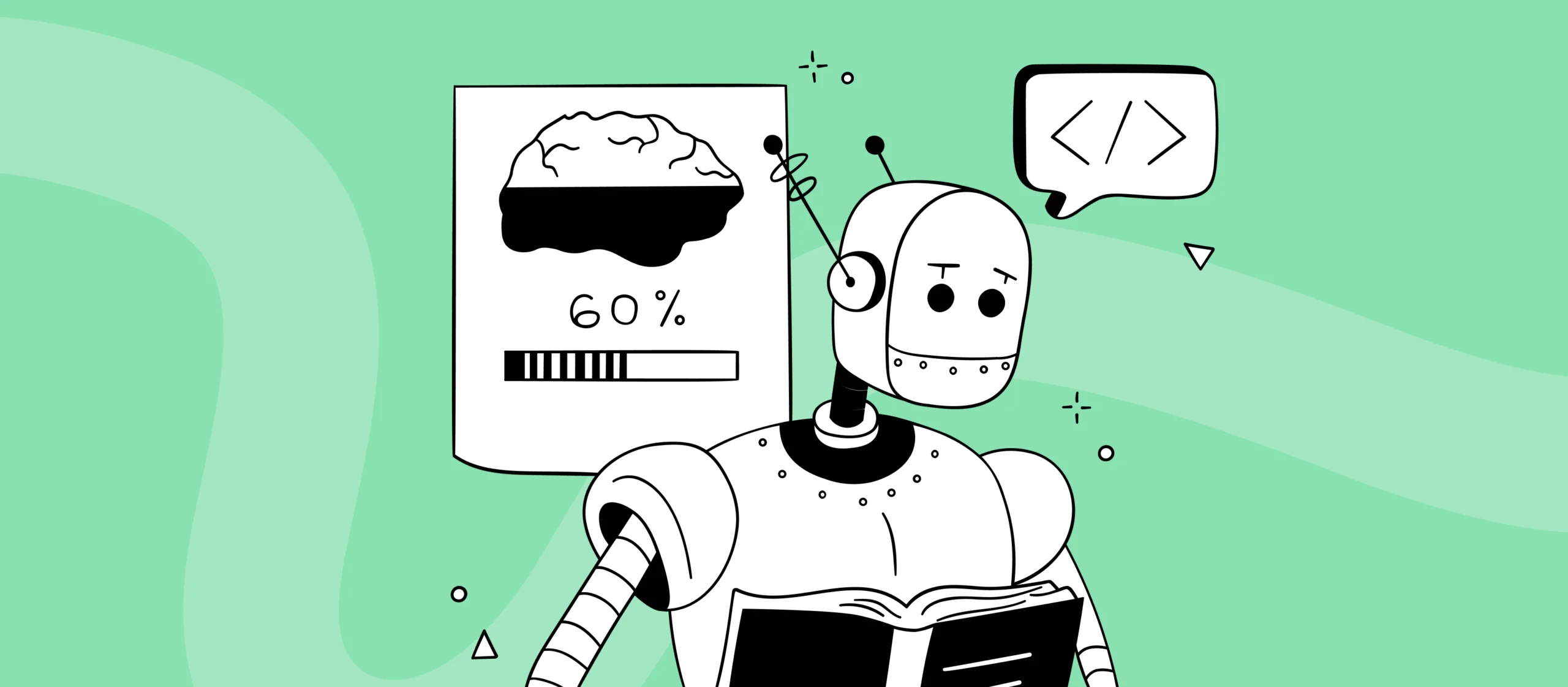
An illustration of a robot analysing information from a book and a panel with a brain icon and a progress bar, symbolising using AI to organise knowledge, do research, and support a marketer's work.
Uśmiechnięta młoda kobieta o blond włosach do ramion, z kolczykiem w nosie, ubrana w czarną koszulkę, na żółtym tle.
Agnieszka Rapacz
Creative Designer & Strategist
14 min
Creatives
Meta Ads

AI in creative marketing: where it really helps and where it doesn’t deliver out of the box [2026]

AI in creative marketing has well and truly become part of teams’ daily work — from ChatGPT and Claude for research, to Midjourney, Flux, and Arcads for creative production. It helps with research, speeds up brainstorming, supports brief-writing, makes creative variation easier, and shortens the path from idea to first concept. The problem is that two extreme narratives still circle generative AI: either “it’ll do everything for you” or “it’s useless.” The truth is somewhere in between. AI really can take work off a team’s plate and speed up specific stages, but it doesn’t replace strategy, it doesn’t understand the business goal for you, and it rarely delivers a finished asset without iteration, fixes, and quality control.

What you'll learn from this article:

  • where AI genuinely helps in a marketer’s daily work,
  • at which stages of the creative process it saves the most time,
  • why it works best as part of a process, not a magic shortcut,
  • why AI rarely delivers a finished asset “out of the box,”
  • how to use AI for research, insights, briefs, brainstorming, and creative variation,
  • and how to combine AI with testing, creative strategy, and working for the algorithms.

AI in creative marketing — a quick answer

In 2026, AI in creative marketing helps most with: organising briefs, research and spotting insights, brainstorming and generating variants, fast prototyping before production, varying creatives for different placements, and adapting campaigns for foreign markets. It doesn’t, however, replace strategy, brand knowledge, or creative decisions. It works best as part of a process, not a magic shortcut — it produces attractive content, but rarely delivers a finished asset without iteration, fixes, and quality control.

Where AI really helps in creative marketing - 7 areas

You could get the impression today that AI is the answer to everything. In practice, it works best when you don’t try to replace the whole of creative work with it, but instead slot it into a well-designed process. That’s when it becomes real support: it speeds up research, organises context, helps you move from a single idea to several directions, and shortens the path to test variants. But when you treat it as a shortcut, it very quickly starts producing content that’s aesthetic but bland.

It’s best to start from the fact that AI isn’t one tool for everything. Its greatest value appears when you use it at the right stage of the process. Not instead of strategy, but within it. Not instead of thinking, but as a way to speed up work that someone on the team still has to deliberately design.


💡 AI works best as part of a process, not as a shortcut. It gives the most when it speeds up specific stages of the work, rather than pretending to replace the whole strategy.


Briefs and organising context

This is one of those moments where AI really makes a difference. Before the first graphic is made, you have to sort out the campaign objective, the audience, the funnel stage, the main message, and the brand’s constraints. And this is exactly where language models work brilliantly as support for structuring briefs, pulling key takeaways out of conversations, and laying out test hypotheses.

The key, though, is not to start from scratch every time. AI works much better when it operates on a consistent brand context: it knows the tone of voice, the personas, the business goals, and the communication framework. Then the brief doesn’t come out generic — it starts being genuinely useful.


👉 If the brief is chaotic or too general, AI will only speed that chaos up.


Research and insights before the creative

Here AI can be really strong. Language models like ChatGPT, Claude, and Gemini mean that instead of guessing what “might work,” you can feed customer opinions, comments, competitor communication, or recurring threads in reviews into the process, and pick up the dominant themes, the most common objections, emotions, and buying motivations far faster.

AI handles the following well:

  • spotting recurring problems and motivations,
  • separating rational arguments from emotional ones,
  • analysing negative reviews,
  • pulling out quotes that can become an ad hook.


💡 AI speeds research up brilliantly. But an automatic insight doesn’t exist — it only emerges once you connect the data with context.


This is a huge acceleration. But here comes an important “but”: speeding up research doesn’t yet give you a finished insight. An insight only begins once you connect the data with the campaign context, the business goal, the funnel stage, and the audience’s real situation. The model alone can point to patterns, but it won’t decide for you which of them actually make sense.


Reverse insighting

It’s worth going a step further and using the reverse-insighting technique.

• Instead of asking: What’s the motivation to buy?
• It’s better to ask: Why would someone ignore this ad? Why would they not trust this brand?

This approach shifts the perspective from the brand’s narrative to the user’s reaction. And it’s the reaction that the algorithm judges.


Brainstorming and designing variants

At the exploration stage, AI works like an extra pair of eyes. It doesn’t replace the creative team, but it speeds up the moment of moving from one idea to several real directions. It can generate alternative narrative angles, “stress-test” an idea, lay out a few variants of the same story for different insights, or suggest different interpretations of the same problem. This pairs well with thinking about A/B testing variants — instead of sensing which angle will work, you can quickly prepare a few creative hypotheses to genuinely test.

This is especially useful when you don’t want to get stuck on your first instinct. Instead of sitting with one idea too long, you can build several directions to assess more quickly and check which of them have testing potential.

But this is exactly where it’s easy to make a very common mistake: generating five very similar concepts. In an environment where the algorithm quickly eliminates ill-fitting material, variety of signals matters more than subtle differences in text layout or background colour. Generating several similar variants is one of the 10 most common mistakes in Meta Ads creatives, whether you use AI or not. That’s why brainstorming with AI should lead to genuine contrasts between variants, not aesthetic variations on the same idea.


⚠️ The biggest mistake with AI? Generating several similar concepts instead of several genuinely different directions.


The truth is that creative is the new targeting. (We wrote more about why creative has become the new targeting in Meta Ads in a separate article.) If the variants don’t differ in meaning, the system isn’t getting anything genuinely new.


Fast prototyping before production

This is one of AI’s strongest use cases. If you need initial sign-off on a concept — from the client or from the team — AI lets you quickly prepare a rough layout, a sketch of a key visual, a mockup of the first 3 seconds of a video, or a visual interpretation of a single insight.

And this is exactly where its advantage is very practical: it’s not about producing a finished campaign, but about checking whether a given direction is even worth pursuing. A prototype like this organises the discussion, speeds up decisions, and makes internal communication — and the client–agency exchange — easier. The team sees what it’s really talking about faster.

This is especially useful when a lot of people are circling a concept and it’s easy to get bogged down in abstract descriptions.


Production and varying creatives

In the context of Andromeda and automation in Meta or Google, one thing becomes key: the number of sensible variants based on quality source material. This is exactly where tools like Midjourney, Flux, Adobe Firefly, and DALL-E start genuinely cutting working time in creative automation. They help with:

  • extending crops for different aspect ratios,
  • changing the background and context without another shoot,
  • generating alternative shots of the same scene,
  • adapting for different placements and markets,
  • preparing variants for different funnel stages,
  • creating base material for further creatives.

That doesn’t mean AI replaces the designer or quality control. But it can shorten the path from base material to a larger number of test variants. And in performance campaigns, that really matters.

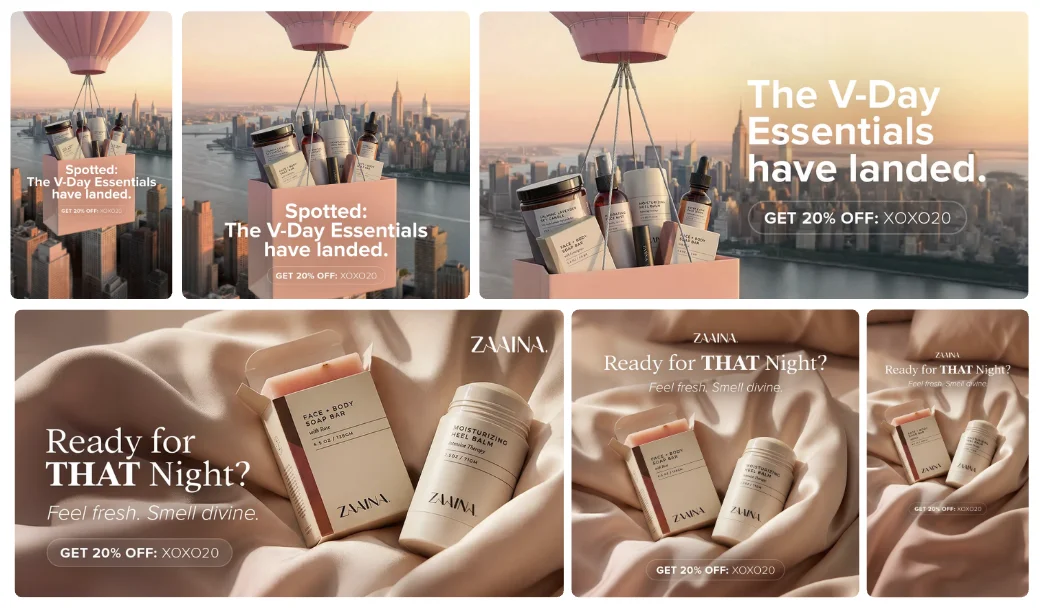
A set of variants of the same Valentine's Day campaign for a cosmetics brand, showing AI-assisted creative adaptation across different formats, aspect ratios, and ad placements.


A good source material remains the foundation. Professional photos and video still build the credibility and quality of communication. AI can make better use of them, but it doesn’t replace valuable base material.


💡 AI doesn’t replace solid source material. It works best when it helps you adapt, develop, and vary it faster.


Animating statics, UGC, and testing new formats

AI can also be very useful when you need to test a format faster without full production. Today it’s relatively easy to turn a static graphic into a simple animation: add background movement, a subtle zoom, a product highlight, or animated text. That’s often enough to:

  • increase attention in the feed,
  • check a video format without producing a full spot,
  • give the algorithm a different signal.

UGC works in a similar way. If there’s no budget or time for full production with creators, AI gives you an alternative: tools like Arcads let you generate realistic AI-generated UGC videos with a character delivering your script — no shoot, no actors, no post-production. You can test concepts, character types, communication tone, and narratives faster without bringing in a whole external production. In some campaigns, AI-generated UGC can function as a normal, scalable part of the strategy — especially where test pace and production flexibility matter.


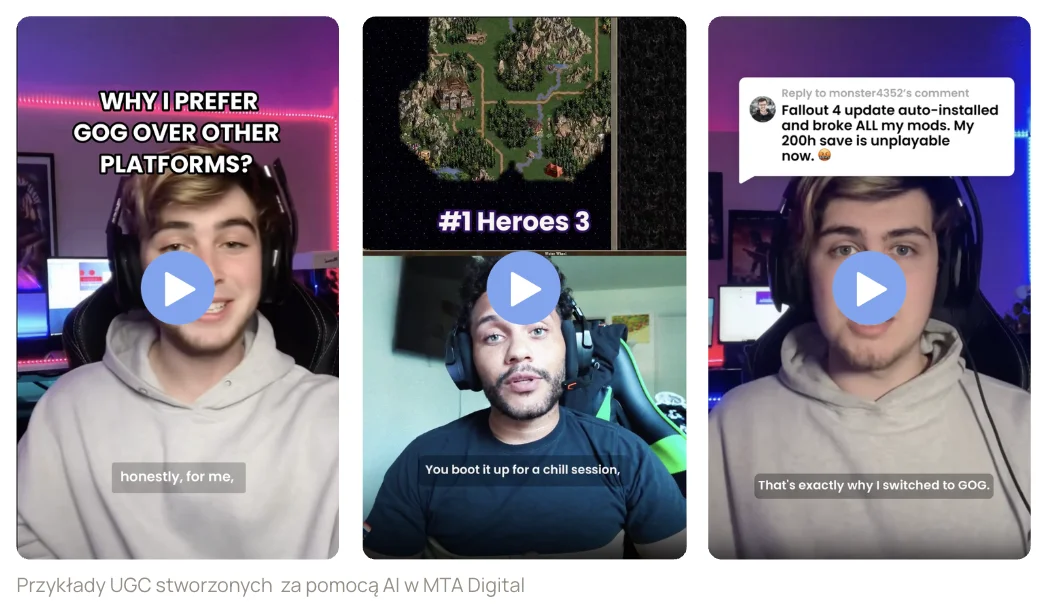
Examples of UGC creatives generated with AI and used to test different ad messages.


But again: this only works when the character, narrator, or “lead” is designed deliberately. A random face generated by a model won’t automatically become a good ad persona.


Adapting and scaling campaigns for foreign markets

When a campaign starts working, the natural need to scale appears: to other languages, other markets, other audience segments, other funnel stages, and other formats. And this is exactly where AI really helps — because instead of building everything from scratch, you can adapt what already works, both at the copy level and in the visual layer.

Language models work well for turning a sales message into a prospecting one, matching tone to a different market, shortening the message for dynamic formats, and preparing versions for different segments, for example new and returning customers.

Generative tools for graphics, in turn, help change the visual context for a different country, swap out the background or the product’s surroundings, and fit the layout to new formats without rebuilding the whole creative. This is the stage where AI genuinely speeds up a campaign’s expansion.

But it’s very easy to fall into the trap of automatic copying. Literal translations that ignore cultural context, a subtle loss of the brand’s tone, visual shortcuts that lower the premium quality, or inconsistent communication across markets — all of this can spoil the effect very fast. Scaling isn’t just language. It’s also how price is presented, the level of formality, the aesthetic, the colours, the symbols, and the dynamics of the message, which can be read completely differently in different countries.


💡 AI can speed up scaling, but it doesn’t replace local context and quality control.


That’s why, when expanding, it’s better to scale not just the content but also the way you think about the ad. Instead of asking the tool for a simple translation, it’s much better to adapt the message to the specific market: account for differences in price communication, the level of formality, and sensitivity to a quality argument, and keep the brand’s tone. Ultimately, it’s the tests and the data from a given market that should decide whether a particular variant really makes sense.

 

What AI CAN'T do in creative marketing — the tool's limits

And here we come to the most important limitation. AI is very good with overall aesthetics, mood, and composition. It’s much worse with the details that matter so much in ads: proportions, captions, legibility, typography, and consistency with the brand’s visual identity system. That’s exactly why, in most cases, generating is only one stage, after which manual work appears anyway: corrections, fixes, fitting to format, adding copy, and sometimes even a complete rebuild of elements.


A set of creatives prepared with AI, showing the variation of messages and ad formats for seasonal campaigns.


AI very easily produces content that’s visually attractive but empty in meaning. And that’s a limit you can’t jump over with the tool alone. This is where experience, a sense of aesthetics, brand knowledge, and the ability to make the right decision begin.


⚠️ AI rarely delivers a finished asset without fixes. Most often it gives a good starting point, but the final result still needs manual work and quality control.


This is also why most tutorials on the internet don’t work in real campaigns. They show AI detached from context: the brand strategy, the campaign goal, the funnel stage, or production constraints. The result? Graphics that look good on LinkedIn but aren’t fit for Social Ads.


Why a good prompt isn't enough

A few myths have grown up around prompting (also known as prompt engineering). Of course a good prompt matters, but not because it’s long or full of technical terms. The difference between a “nice” prompt and a “useful” one comes down mainly to context. A good prompt starts by defining the role and the task: who the AI is meant to be, what exactly it should do, to what end, for which brand, and for which stage of the process.

In practice, sensible prompting looks more like this:

idea → first prompt → assessment → correction → next prompt → selection → manual refinement. Each iteration is a new hypothesis, a new variant, and new feedback. The best results usually appear after a few iterations, not on the first generated image.

This matters a lot, because many marketers treat a prompt like a one-off command. It’s much better to think of it as part of a testing process.


👉 A prompt isn’t a magic command. It’s part of a process of iteration, assessment, and refining the direction.


So where does the line run?

Put simply: AI speeds work up brilliantly wherever you need to quickly analyse, organise, explore, and prototype. It’s worse wherever decisions begin that require feel, experience, brand knowledge, and judging quality in a business context.

That’s why making sensible use of AI in a marketer’s work starts not with the question “which tool should I do this with?”, but with “at which stage of the process will this tool genuinely help?”.

And that’s the healthiest approach. Not chasing every new generator, but getting a good grip on a few areas and knowing when AI really does shorten the path to a better result.


What does this mean in practice for a marketer?

A great deal — but it really comes down to one thing: AI doesn’t remove the need for strategic thinking. Quite the opposite — it strengthens it. The easier it is to generate images, copy, layouts, and ideas, the more it matters whether you know:

  • who you’re speaking to,
  • what you’re testing,
  • why you’re doing it,
  • and at which funnel stage a given creative is meant to work.

This pairs well with the rest of this series: creative strategy, the 5 stages of customer awareness, the approach to testing, and thinking about the creative as a signal for the system. AI doesn’t stand beside these topics — it simply speeds up the work inside them. And if the creative strategy process interests you, check out the step-by-step process.

AI genuinely helps in a marketer’s work — but not equally everywhere. It gives the most with briefing, research, insights, brainstorming, prototyping, and varying creatives. It makes it easier to reach several directions faster, organises context, and shortens the path to the first test versions.

What it doesn’t deliver “out of the box” is a finished, polished asset with no strategy, no context, and no human quality judgement. Because AI can speed up many stages of the work, but it won’t replace experience, creative decisions, and an understanding of the business goal.

About the author

Agnieszka Rapacz — As a creative strategist and graphic designer, she designs ad creatives that combine technology with an intuitive understanding of audiences and how algorithms work. In her work she relies on creative strategy, testing, and analysing results, creating creatives that support sales and campaign scaling. She makes sure ads are not only aesthetic but, above all, effective — basing them on data without losing her instinct and creative intuition. Find her on LinkedIn.

Table of contents

See other articles

Dorota Puzio, Google Ads Specialist at MTA Digital
Google Ads Analytics

Google Ads is under-reporting your conversions. And you probably don’t know it.

Conversion tracking in Google Ads is failing more and more often. Some orders never reach the panel, ROAS shows up lower than it really is, and the algorithm learns on increasingly patchy data. Google has responded with a new solution — Google Tag Gateway — which is meant to "recover" those lost conversions. But will it actually help, or is it another piece of hype that ends in prettier numbers in the report but not in your pocket? We're checking, no sugar-coating.
Portrait of Agnieszka Rapacz, Creative Strategist at MTA Digital and author of the article, on an orange background with yellow graphic elements.
Creatives Meta Ads

The 10 most common mistakes in Meta Ads creatives that hurt campaign results [2026]

Mistakes in Meta Ads creatives hurt campaign results more often than wrong settings, a poorly chosen budget, or off-target audiences. Very often the problem starts much earlier — at the creative stage. That's where it's decided whether an ad will carry a clear message, or just become another asset dropped into the campaign with no real role. Today, in a world of Meta Ads, automation, and systems that judge an ad's relevance faster and faster, the creative isn't an add-on to performance work. It's one of the most important elements shaping the result.
Illustration of a person working on an ad creative, surrounded by icons of an idea, analysis, and a positive reaction, symbolising strategic ad design as an important signal for the Meta Ads algorithm.
Creatives Meta Ads

Creative is the new targeting in Meta Ads. Myth or new reality? [2026]

"Creative is the new targeting" — this slogan swept through the paid social world in 2026. Not so long ago, your edge in Meta Ads often started with the settings: precise targeting, campaign splits, exclusions, and placements. Today that centre of gravity has clearly shifted. Ad systems analyse more signals faster, earlier, and more broadly than before, and the creative itself is no longer just the "packaging" of an ad. More and more, it's the creative that tells the algorithm who this message is for, in what context it makes sense, and when it's worth showing.

It’s time for your brand.
Click and let’s start growing together.